DigiPi Hotspot · Volume 1
DigiPi Hotspot — Vol 1: Introduction & Platform
KM6LYW's ham-radio data hotspot on a Raspberry Pi
1.1 About this volume
DigiPi is one of those projects that quietly reorganizes how you think about a whole corner of the hobby. On the surface it is “a Raspberry Pi with some ham software on it.” In practice it is a small, purpose-built appliance that takes the sprawling, fiddly, driver-hostile world of amateur digital modes — APRS, packet, Winlink, FT8, JS8Call, RTTY, PSK31 — and hands it to you through a web browser on your phone. No laptop, no monitor, no keyboard, no Windows sound-card roulette. You join a Wi-Fi network the little box publishes, you open a page, and you are on the air with data.
This volume sets the stage: what DigiPi actually is, why it sits in a very specific lane that is easy to confuse with the DMR hotspots, what hardware it runs on, how the software is built and distributed, and how the “hotspot” connection model works. Volumes 2 and 3 get concrete — Vol 2 walks the modes one by one, and Vol 3 covers the interface hardware you bolt onto your radio. Vol 4 is the reference card: tables, glossary, default access details, and a consolidated “verify this on a real unit” checklist.
A note on how this deep dive was written: DigiPi is researched from KM6LYW’s public documentation, not from a unit on the author’s bench. Where a claim would need a real box to confirm — an exact price, a precise menu label, a bench behavior — it is flagged with a TBD — verify callout rather than asserted. There are a fair number of those, and that is deliberate. Prices drift, menus get relabeled between image versions, and the honest move is to point you at the primary source (craiger.org/digipi) rather than pretend to certainty this project cannot have.
1.2 What DigiPi is
DigiPi is an SD-card software image for the Raspberry Pi, created by Craig Lamparter, KM6LYW (KM6LYW Radio). He describes it as “an easy-to-use amateur radio data transceiver hotspot for Raspberry Pi” — “all radio data modes easily accessible over Wi-Fi via your phone or web browser.” The 2.0 release was announced under the banner “Ham Radio Data Hotspot.” The official documentation lives at craiger.org/digipi and digipi.org.
Read that description carefully, because the key word is data. DigiPi is a modem-and-interface appliance for the amateur digital data modes. It does not generate RF. It does not contain a transmitter. What it contains is:
- The software modems (soft-TNCs and DSP mode engines) that turn your callsign, your Winlink email, your FT8 exchange, or your APRS beacon into audio tones — and turn received tones back into data.
- A web interface that exposes every one of those modes as a page you open in a browser.
- The glue to key your radio’s transmitter (PTT) and route audio in both directions.
The RF — the actual transmit and receive — comes from your existing radio. On VHF/UHF that is typically an FM handheld or mobile; on HF it is an SSB transceiver. DigiPi is the brains and the plumbing; your radio is the muscle.
1.3 The distinction that matters: DigiPi is not a DMR hotspot
If you have spent any time around “hotspots” in ham radio lately, the word almost certainly conjures a small board with an OLED screen and a little antenna — a DMR/digital-voice hotspot. Those devices (see the sibling deep dives on the WPSD hotspot and the SkyBridge Plus) are built around an MMDVM RF hat: a small transceiver board that sits on the Pi and provides its own low-power RF link on 70 cm. Their whole job is to bridge a digital-voice HT — a DMR, D-STAR, or Fusion handheld like the AnyTone D878 — over the internet to a talkgroup or reflector. You talk into a DMR HT; the hotspot’s own RF hat hears it, digitizes nothing (it is already digital), and forwards your voice to the network. That is a voice bridge with its own radio.
DigiPi is a different animal in three concrete ways, and getting these straight is the single most useful thing in this volume:
- No DMR, no digital voice. DigiPi carries data modes — APRS, packet, Winlink, FT8, and friends. There is no DMR, D-STAR, or Fusion codec in the picture. (For the DMR world itself, the DMR network topic is the place to start.)
- No RF hat of its own. A DMR hotspot is a tiny radio. DigiPi is not — it has no MMDVM board and no transmitter. It borrows your radio as the transmitter.
- It supplies the modem, not the RF. Where a DMR hotspot supplies the RF and leaves the audio codec to your HT, DigiPi supplies the modem and audio/PTT interface and leaves the RF to your HT.
So the mental model is almost inverted. A DMR hotspot: its radio, your internet. DigiPi: your radio, its modem. Both are called “hotspots” and both live on a Raspberry Pi, which is exactly why people conflate them — but they solve different problems for different modes. If your goal is to key up a DMR talkgroup from the couch, you want a WPSD-class device. If your goal is to send a Winlink email over HF, spot APRS traffic, or run FT8 without dragging a laptop to the radio, you want DigiPi.
1.4 The platform: which Raspberry Pi
DigiPi runs on a range of Raspberry Pi boards. The officially supported and recommended lineup:
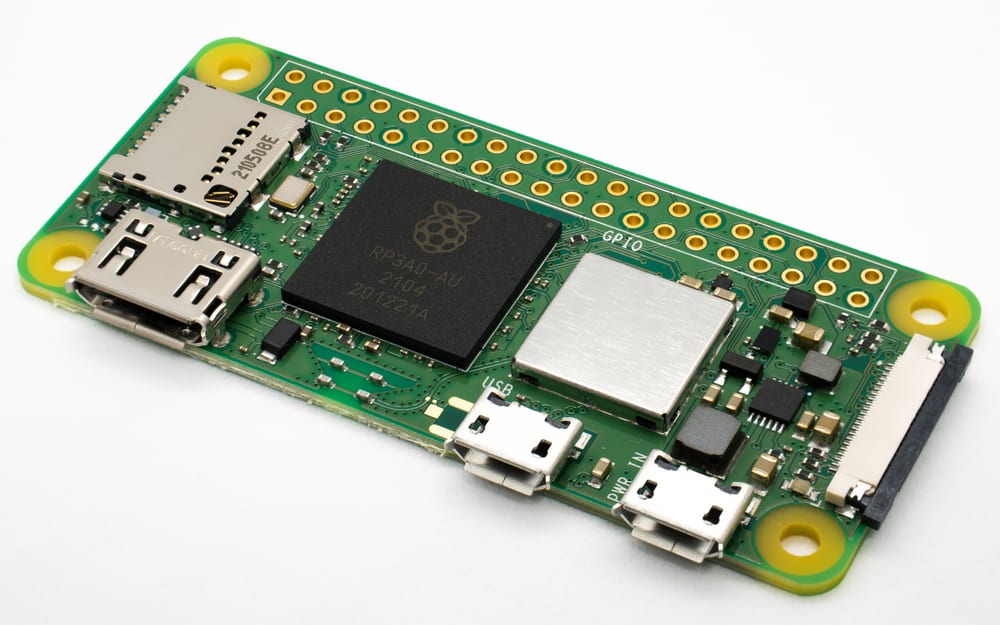
- Raspberry Pi Zero 2 W — the recommended host, and the sweet spot for this project. It is small, cheap (on the order of $15), sips power, and its 40-pin header is exactly what the purpose-built interface hats are designed to mate with. For a headless data appliance that lives clipped to a radio, it is ideal.
- Raspberry Pi 3, Pi 4, and Pi 5 — all supported. These give you more CPU headroom (useful if you push the box hard or want a faster web UI) and, on the Pi 4/5, more I/O, at the cost of size and power draw.
TBD — verify. Confirm the current exact supported-board list and any per-board caveats against craiger.org/digipi. Board support and the “recommended” designation can shift between image versions.
One important compatibility note from the documentation: the experimental HDMI-display feature is not compatible with the Pi Zero 2 W. This is a niche feature — DigiPi is designed to run headless, and the whole point is that you drive it from a browser — but if you specifically wanted a plugged-in HDMI monitor showing status, you would need a Pi 3/4/5 rather than the Zero 2 W. For essentially everyone, the Zero 2 W’s lack of HDMI-display support is a non-issue.
TBD — verify. Confirm on a real unit that the HDMI-display feature remains experimental and Zero 2 W–incompatible in the current image, and what exactly it displays. This is documented but the author has not seen it run.
1.5 The software: open source, Trixie base, versioned image
DigiPi’s software is open source and hosted on GitHub. That matters both philosophically (you can read what your station is running) and practically (the components are the same mainstream Linux ham applications many operators already trust, pre-integrated and pre-configured).
The 2.0 generation was re-based on Raspberry Pi OS “Trixie” — the Debian 13–derived release — bringing a current OS underneath, the latest Direwolf beta for APRS/packet, and reworked GPIO code for the interface hats and displays. The SD image is versioned: craiger.org listed 2.1-3 as the July 2026 image, and 2.2-1 (September 2026) is the current image as of September 2026.
The bundled application stack is a who’s-who of open-source ham data software, each doing what it does best:
- Direwolf — the software TNC that handles APRS and AX.25 packet, plus the new animated APRS map.
- WSJT-X (version 3.0.1 in current images) — the weak-signal engine, most famously FT8.
- Pat (version 1.0.0) — the modern Winlink client, presenting an email-style inbox/outbox.
- JS8Call — keyboard-to-keyboard weak-signal messaging built on the FT8 waveform family.
- FLDigi — the swiss-army-knife for CW, PSK31, RTTY, MFSK, and SSTV.
- ARDOP — the HF modem that carries Winlink (and other traffic) over SSB.
New capabilities that landed in the 2.x line and are worth calling out now (Vol 2 covers each in depth):
- An animated APRS tactical map — the “Direwolf Dashboard” — that plots stations live.
- An APRS WebChat / messaging interface for sending and receiving APRS messages from the browser.
- A Bluetooth pairing web interface and Bluetooth TNC support, so a phone app like APRSdroid can talk to DigiPi as a wireless TNC.
TBD — verify. Confirm the exact bundled version strings (Direwolf beta build, WSJT-X 3.0.1, Pat 1.0.0, JS8Call, FLDigi, ARDOP) and the current image version against the download page. Version numbers move; these reflect the fact-sheet snapshot, not a unit inspected by the author.
1.5.1 How you get the image: open source, Patreon-gated build
Here is a nuance that trips people up. Every piece of DigiPi’s software is open source — you could, in principle, assemble it yourself from GitHub. But the ready-to-flash “collective” SD image — the one-download, everything-configured card that makes DigiPi DigiPi — is distributed through KM6LYW’s Patreon, from as little as $1. This is the maintainer’s chosen support model: the image is a password-protected download for patrons (the author: “Anything gets you access to the DigiPi image, even a dollar”), and the author asks that it not be posted online (“Please share with friends, but do not post this image online”). No free image download exists, and every archived request for an image file since 2022 returned a password prompt. The code is free; the convenience of the packaged, tested image is what the pledge supports. It is a common and defensible arrangement for a one-person project that saves every user hours of integration work. The DigiPi repository on GitHub (craigerl/digipi) carried no licence file as of September 2026.
1.6 The “hotspot” connection model
The reason DigiPi earns the word “hotspot” has nothing to do with RF and everything to do with how you connect to it. Out of the box, with no monitor and no keyboard, DigiPi boots as its own Wi-Fi access point:
- It broadcasts an SSID of
DigiPi. - The default password is
abcdefghij(the vendor’s published default).
You join that network from your phone or laptop, then browse to a setup page where you hand DigiPi your home Wi-Fi credentials. From that point on, DigiPi joins your home network like any other device, and you reach it by name at http://digipi/. The full first-join walk-through — the setup page at http://10.0.0.5/ (then Wifi) and the Initialize page where you set your callsign and grid square — is spelled out in Vol 4’s reference section, so it is all in one place when you have a card in hand.
The payoff of this model is true headless operation. There is no monitor, no keyboard, no HDMI cable, no mouse. The Pi can be a bare board zip-tied behind a radio, powered from USB, with nothing plugged into it but the interface to the rig. Everything — configuration, mode selection, sending a Winlink email, watching APRS traffic crawl across a map — happens in a browser tab. For a go-kit, an EmComm deployment, or just a tidy shack, that is a genuinely different experience from the laptop-tethered digital-mode station most of us grew up with.
1.7 A mode catalog at a glance
Volume 2 is the operator’s manual; this is just the menu, so you know the scope before you commit. DigiPi puts the following within reach of a browser tab:
- APRS — position beaconing, the live WebChat messaging interface, a digipeater, an IGate (internet gateway), and the animated tactical map.
- AX.25 packet — classic packet networking, a KISS TNC interface, and a Bluetooth rfcomm serial-port TNC for wireless apps.
- Winlink email — via Pat, with a web inbox/outbox, over ARDOP on HF or packet on VHF.
- FT8 — the ubiquitous weak-signal digital mode, via WSJT-X.
- JS8Call — conversational weak-signal messaging.
- FLDigi modes — CW, PSK31, RTTY, MFSK, and SSTV (slow-scan TV).
- CAT / rig control — rigctld for frequency and mode control of USB rigs.
1.8 Who it’s for
DigiPi is aimed squarely at the operator who wants to run digital data modes with the least possible fuss and the least possible gear on the desk. A few profiles it fits especially well:
- The APRS/Winlink EmComm operator who wants a compact, phone-driven, battery-friendly data station for a go-kit — no laptop to boot, no drivers to fight.
- The digital-curious HT owner who already has a cheap FM handheld (a Baofeng F8HP is a fine on-ramp) and wants to try packet, APRS, or VHF Winlink without buying a big radio.
- The HF data operator with a USB-CAT rig — an IC-7300, an IC-705, a Xiegu X6100 — who wants FT8, JS8Call, and ARDOP-Winlink available from the couch on a single USB cable.
- The tinkerer who values that the whole stack is open source, mainstream Linux ham software, running on the most hackable single-board computer there is.
Who it is not for: anyone whose actual goal is digital voice. If you want to key a DMR talkgroup or a Fusion room, DigiPi does none of that — that is the WPSD/SkyBridge lane, and the contrast is exactly why this deep dive spent a whole section on it. Know which problem you are solving, and DigiPi either is or isn’t the tool. When it is, it is a remarkably clean one.
1.9 Why the browser-driven model is the real innovation
It is worth pausing on the thing that makes DigiPi feel different, because it is easy to undersell. The individual applications DigiPi bundles are not new — Direwolf, WSJT-X, Pat, JS8Call, and FLDigi have all been available for Linux for years, and a determined operator has always been able to install them on a Raspberry Pi. What has not existed, until projects like this, is a coherent front end that hides all of the integration.
Anyone who has set up digital modes the traditional way knows the pain: pick a sound card, discover it is enumerated as hw:1,0 today and hw:2,0 tomorrow, set the sample rate, wire up PTT through a serial DTR/RTS line or a GPIO script, tell each application about all of it separately, and then reconcile the fact that WSJT-X, Pat, and FLDigi all want exclusive access to the same audio device. On Windows the story is different but no better — it is virtual audio cables and COM-port bingo. This friction is why a large fraction of licensed hams who want to try digital modes never quite get on the air.
DigiPi’s contribution is to solve that once, in the image, and then present the result as web pages. The shared audio device and the single PTT line are configured for you; switching modes is picking a tile, not reconfiguring a station. You never see a terminal, never edit a config file, never learn which hw: device is which. That is the difference between “a Raspberry Pi you could run ham software on” and “an appliance that runs ham data modes.” The hardware is ordinary; the packaging is the product.
1.10 A word on expectations
DigiPi is a one-person open-source project with a small-batch, Patreon-supported distribution model. That is a strength — it is nimble, actively developed, and reflects a real operator’s priorities — but it also means you should calibrate expectations accordingly. Image versions move quickly, features arrive and get relabeled, and the documentation at craiger.org is the living source of truth in a way that a mass-market product’s manual is not. This deep dive captures a mid-2026 snapshot faithfully, but the honest guidance for any specific detail is always: check the current image and the current docs. That posture is baked into the TBD-verify callouts throughout these volumes.
In Vol 2 we open the browser and actually operate — mode by mode.
Comments (0)