Xiegu X6100 · Volume 4
Xiegu X6100 — Vol 4: Reference
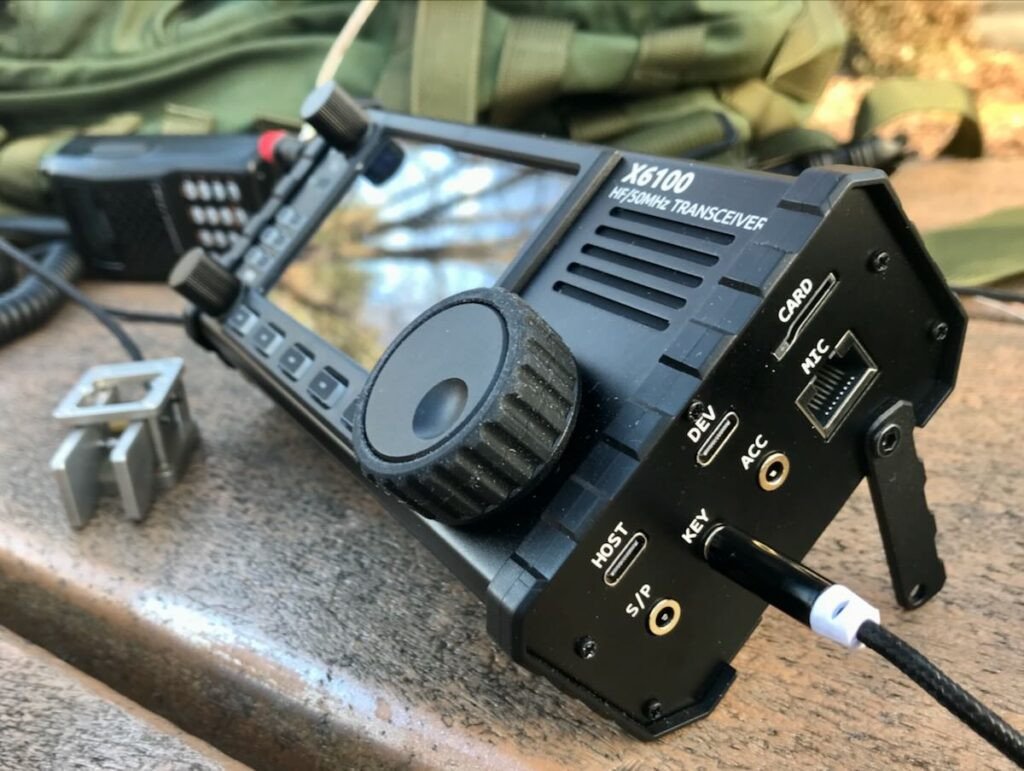
HF/6m with built-in tuner, color touchscreen, internal battery
4.1 Tips and tricks
4.1.1 Battery management
The internal battery is the X6100’s most-aged-by-use subsystem. Lithium-ion cells degrade with every charge cycle, more so with deep discharges and high-temperature charging. Practical guidance:
- Don’t run to empty. When the battery icon shows 20-25%, switch to external power (Anderson Powerpole input) or shut down. Repeated discharges below ~15% accelerate aging.
- Don’t store at 100%. If the radio is going to sit unused for weeks, discharge to ~50% before storage. Storage at full charge ages the cells.
- Charge at moderate temperatures. Charging at 30°C is fine; charging at 40°C+ ages the cells noticeably faster.
- Replace at ~70% original capacity. When runtime drops to half of new, the pack is at end-of-useful-life. Replacements run $30-40 from Radioddity.
4.1.2 ATU efficiency tricks
The internal tuner is competent but not magic. A few patterns that help it:
- Pre-tune at each band-change rather than mid-QSO. The ATU’s match for the previous band’s frequency may not be valid at the new band, and a stale match shows up as elevated SWR + reduced TX output.
- For an EFHW, run the tuner once at the band center and trust it for the whole band. EFHW SWR shifts modestly across the band but the tuner’s stored match generally tracks well enough.
- For a multi-band non-resonant antenna (random wire, doublet), re-tune at any frequency change >50 kHz. The match shifts more aggressively.
- If the tuner fails (“tune unsuccessful”), check the antenna physically before retrying. A common cause is a broken counterpoise wire or a corroded UNUN connector.
4.1.3 CAT for FT8 / digital modes — minimum-friction setup
The straightforward path to FT8 on the X6100:
- Update firmware to 1.1.7 or later (this exposes the front-end attenuator and improves CAT stability).
- Connect USB-C from X6100 to host.
- Install WSJT-X (free, cross-platform, official from wsjt.sourceforge.io).
- WSJT-X Settings → Radio: Rig = “Yaesu FT-817”, Serial port = your X6100’s port, Baud = 4800, PTT = CAT, Mode = USB. Click “Test CAT” — should report success and show the radio’s current frequency.
- WSJT-X Settings → Audio: Input + Output = X6100 USB Audio. Test the input by speaking into the mic (you should see the level meter twitch).
- On the X6100: set Menu → Audio → USB IN Level to ~50%, USB OUT Level to ~50%. (Adjust later based on whether WSJT-X reports your TX audio as low/high.)
- WSJT-X Settings → Frequencies: import the default amateur band plan (built-in).
- Tune the X6100 to 14.074 MHz USB (FT8 on 20 m), watch the WSJT-X waterfall populate with decodes. Once you see decodes, you’re ready to call CQ.
The X6100 + WSJT-X combination is one of the cleanest setups in the lineup — no driver installation, no proprietary software, no audio mixer juggling. The composite-USB device just works.
4.1.4 The 10 W boost mode
Firmware 1.1.8 and later expose a 10 W TX boost mode. Operational notes:
- It’s 10 W output, but draws roughly 2.5 A (vs ~1.5 A at 5 W). Battery runtime drops by ~30% in boost mode.
- The PA runs hotter. For extended TX duty cycles (e.g. an FT8 run), the radio may reduce output power automatically if the PA temp sensor exceeds threshold.
- Use it selectively — not as default. The 3 dB gain from 5 W to 10 W is one S-unit on the receiving station’s meter; useful for marginal contacts, not necessary for routine work.
- Don’t use 10 W boost on the XPA125B amplifier input. The amp’s input is rated for 5 W drive; 10 W will overdrive the amp’s input attenuator and may damage it.
4.1.5 Front-end attenuator for strong-signal environments
Firmware 1.1.7+ exposes a menu-selectable RF attenuator: 0, -10 dB, -20 dB. Use it:
- At night near a strong AM broadcast station — common sympton is “weird beats and warbles” on the 80 m or 40 m band, often the AM broadcast intermodding with itself in the X6100 front end. -10 dB usually clears it.
- Near a strong shortwave broadcast during a contest — same symptom, same fix.
- When you have an external preamp (e.g. on a remote receiving loop) and the X6100 is being driven hard by the preamp’s output.
The attenuator is RX-side; it does not affect TX power. Toggle it dynamically as conditions warrant.
4.1.6 Random-wire matching beyond the tuner’s range
The internal ATU’s claimed range is ~8:1 SWR. In practice, on the right band, it’ll match many random wires (15-50 ft) that present 10:1 or 15:1 raw SWR. The match isn’t optimal — there’s loss in the tuner’s network at high SWR — but it transmits.
When the tuner fails entirely:
- Add a few feet of counterpoise at the radio’s ground stud. A 17 ft wire works for 40 m; 8 ft for 20 m. This shifts the antenna’s feedpoint impedance off the difficult region.
- Try a different band. A 30 ft random wire that won’t match on 80 m may match easily on 40 m or 20 m.
- Add a 9:1 UNUN inline between the radio and the wire. This is a $30 part (or a homebrew 5-min wind of 8-9 trifilar turns on an FT-140-43 core) that drops a 450 Ω feedpoint to 50 Ω. After the UNUN, the internal tuner only has to handle 2-3:1 of residual mismatch.
4.1.7 m operation — under-rated band
The X6100’s 6 m capability is genuinely useful. During the summer Es (sporadic E) season, a 5 W signal on 6 m via a horizontal dipole can produce 500-1500 mile contacts — comparable to what you’d get on HF with similar power. The 6 m antenna doesn’t need to be elaborate: a half-wave dipole at 50 MHz is 9 ft 4 in (2.85 m) per leg, easily hung between two trees or pole-mounted.
Operationally:
- Tune the 6 m band around 50.125 MHz USB (the calling frequency) during Es season (May-August in mid-northern latitudes).
- The waterfall display is especially useful on 6 m — Es openings often produce 5-10 stations simultaneously, all visible at once.
- Pair with the XPA125B amplifier ↗ to get to 100 W when the X6100’s 5 W isn’t enough.
4.1.8 Other operational notes
- Screen brightness has a noticeable battery cost — drop it to 50% or below when running on internal battery. The display drops from ~250 mA at full brightness to ~120 mA at half. Over an 8-hour day this is significant.
- The radio’s clock is set manually (or via a community firmware feature that pulls time from GPS or NTP). Stock firmware has no internet awareness. For accurate logging (essential for digital modes), set the clock manually before each session or rely on the host PC’s clock.
- Firmware updates are non-trivially time-consuming (3-5 min flash + 5-10 min re-configuration). Don’t update firmware in the field; do it on the bench.
- The radio is loud at full audio volume — adequate for portable speech intelligibility in moderate background noise. The internal speaker peaks just above 1 W; in a noisy environment headphones make a real difference.
4.2 Resources
4.2.1 Local documentation
- Manuals:
../manuals/xiegu-x6100/— Xiegu’s official user guide (typically supplied as a PDF; mid-2026 includes updates through firmware 1.1.9), the Xiegu firmware release notes for each version, and a Radioddity-supplied quickstart card. - Firmware history archive:
../../programs/xiegu-x6100/firmware-history/— every firmware version this radio has ever run, archived as ZIP. ~3.8 GB total (most of which is the bundled Linux rootfs images inside each firmware bundle); gitignored from the repo but present locally. - Memory channel backups:
../../programs/xiegu-x6100/memory-backups/— CSV exports from wfView, dated. Most recent backup: TBD — verify the date against the backup directory. - Settings snapshots:
../../programs/xiegu-x6100/settings-snapshots/— markdown files documenting menu values per snapshot date.
4.2.2 Manufacturer and distributor
- Xiegu Technology (manufacturer, Chongqing) — http://www.xiegu.eu (EU distributor with documentation in English) and https://www.xiegu.net (Xiegu China direct, partly in Chinese).
- Radioddity (US importer for the X6100 and most Xiegu products) — https://www.radioddity.com/products/xiegu-x6100. Source for replacement battery packs, the original microphone, replacement screen protectors, and out-of-warranty service.
- Ham Radio Outlet (HRO, US dealer) — also stocks the X6100; https://www.hamradio.com.
4.2.3 Software
- wfView — open-source cross-platform CAT and rig control: https://wfview.org. Source-of-truth for X6100 control software in this series; see Vol 3.
- WSJT-X — FT8, FT4, JS8Call, MSK144, JT65, WSPR: https://wsjt.sourceforge.io. Free, official.
- fldigi — RTTY, PSK31, MFSK, Olivia, and dozens of other digital modes: http://www.w1hkj.com/. Free, official.
- N1MM Logger Plus — contest logger: https://n1mmwp.hamdocs.com/. Free, Windows-only.
- Log4OM / DXLab Suite / Ham Radio Deluxe — general-purpose loggers; all support the X6100 via the Yaesu FT-817 CAT profile.
- Hello X6100 community firmware — https://github.com/im0o/hello_x6100. The active community firmware fork; flashes via SD card same as stock.
4.2.4 Community forums and user groups
- Xiegu users group on groups.io — https://groups.io/g/xiegu. The primary user community for all Xiegu radios including the X6100. Active discussion of firmware issues, ATU behavior, antenna pairings, mods, and bug reports. Searchable archive going back to Xiegu’s first US-market radio (the X1M).
- X6100 subreddit — r/Xiegu, smaller but active.
- POTA / SOTA forums — Parks On The Air (https://parksontheair.com) and Summits On The Air (https://www.sota.org.uk) communities frequently discuss X6100 portable operating tips, tactics, antenna pairings, and field experiences.
4.2.5 Cross-references in this series
- Vol 1 (Overview) — the navigator for this series; X6100 sits in the HF/portable category alongside the XPA125B in Vol 10.
- Vol 10 (Xiegu XPA125B) — the matching 100 W amplifier; the load-bearing companion volume.
- Vol 3 (Programming software landscape) — wfView and other CAT software, cross-radio.
- Vol 4 (Frequency planning and license envelope) — Part 97 band edges, frequency allocations, and the FCC envelope that applies to TX on this radio.
4.2.6 Cross-references to sibling Antennas project
- Antennas Vol 5 (Transmission lines and feedlines) — coax types, loss per 100 ft per band, connector hygiene; relevant for portable feedline choices (the LMR-240 vs RG-58 vs RG-8X tradeoff for portable runs).
- Antennas Vol 6 (Single-band dipoles) — resonant dipoles, the simplest portable antenna option when you have two trees and a band to work.
- Antennas Vol 7 (Multi-band and specialty dipoles) — OCFD, fan, G5RV, ZS6BKW, doublet; shack-side multi-band options.
- Antennas Vol 8 (Fixed verticals) — Hustler 4/5/6-BTV, R-7000, GAP for permanent home installations.
- Antennas Vol 9 (Portable and mobile monopoles) — Wolf River Coil, hamsticks, MP-1, telescoping whips — the portable-vertical workhorse.
- Antennas Vol 10 (Random-wire and end-fed) — EFHW deep dive; the load-bearing portable HF antenna reference.
- Antennas Vol 16 (BALUNs and UNUNs) — the 49:1 EFHW UNUN, the 9:1 random-wire UNUN, the 1:1 choke.
- Antennas Vol 17 (Antenna tuners) — context for the X6100’s internal automatic tuner and when an external tuner is needed.
- Antennas Vol 24 (NanoVNA deep dive) — for measuring the antennas you’ll pair with the X6100 before deploying them.
- Antennas Vol 29 (Use-case matrix) — per-radio antenna recommendations, including the X6100-specific row with 4-tier upgrade ladder.
- Antennas Vol 31 (Regulatory and RF safety) — Part 97 ERP/EIRP limits, MPE calculator, lightning protection.
4.2.7 Other useful references
- POTA (Parks On The Air) main site — https://parksontheair.com — find park entities to activate, see leaderboards, submit logs.
- SOTA (Summits On The Air) main site — https://www.sota.org.uk — summit reference list, scoring rules, activation workflow.
- PSKReporter — https://pskreporter.info — real-time map of where your FT8/PSK signal is being heard by automated monitoring stations. Essential feedback for evaluating antenna performance on a given band/time.
- DX cluster — http://www.dxsummit.fi — community-fed list of who’s working what DX, useful for spotting band openings.
- VOACAP propagation prediction — https://www.voacap.com/hf/ — predicted HF propagation for a given path/time/season. Useful for planning POTA activations to bands likely to be open.
- Radioddity X6100 product support page — https://www.radioddity.com/pages/xiegu-x6100-support — firmware downloads, FAQ, warranty information.
Comments (0)