WPSD DIY Hotspot · Volume 4
WPSD DIY Hotspot — Vol 4: Reference
Hand-built Pi + MMDVM duplex + Nextion display
4.1 Tips and tricks
The non-obvious things worth knowing about running a DIY WPSD hotspot for any length of time:
4.1.1 WPSD vs Pi-Star — the fork story
Mainline Pi-Star (by MW0MWZ) slowed in development around 2022-2023; the upstream pace of MMDVM features had moved past what mainline was tracking. W0CHP-PiStar-Dash (WPSD) is the community fork that took over active development — same Pi-Star foundation, refreshed dashboard, modernised internals, current-with-upstream MMDVM features. By the time of writing (mid-2026), WPSD is effectively the de facto Pi-Star: the W0CHP project ships nightly and stable builds, has an active support community, and is what almost all new hotspot deployments default to. Mainline Pi-Star still exists and still works for older deployments, but new builds should start from WPSD. The migration from Pi-Star (2022) → WPSD (sometime between 2022 and December 2025, per the backup-file naming progression) reflects this transition. The W0CHP project home is https://w0chp.radio; the legacy mainline Pi-Star is at https://www.pistar.uk.
4.1.2 Nextion screen-burn — dim or sleep
The Nextion’s TFT will exhibit faint persistent-image artefacts if it shows a static layout for years (the same fate as any LCD). The mitigation is the dashboard’s Display panel “screen dim after N minutes idle” setting — set it to 10-15 minutes, and the Nextion backlight drops to a low level when there’s no activity for that interval. A full screen-off after a longer interval (30-60 minutes) is even better; the layout returns instantly when any RF activity wakes the hotspot. The WA6HXG layouts include the screen-saver / dim hooks in the layout’s MMDVMHost integration; the WPSD dashboard exposes the timeout values.
4.1.3 Nextion screen sizes — the layout-file mismatch trap
The WA6HXG layouts come in three matched size families — 2.4” / 3.2” / 3.5” — and each .tft file is sized for exactly one Nextion variant. Uploading a 3.5”-sized layout to a 2.4” Nextion produces a layout that’s cropped, off-position, or completely blank; uploading a 2.4” layout to a 3.5” Nextion produces a layout occupying the upper-left corner with empty space everywhere else. The naming convention in the archive (Blue1_Duplex_24in_LHnLHTG_GB_2.0.tft for 2.4” duplex, Blue1_Duplex_32in_LHnLHT_GB_2.1.tft for 3.2” duplex, Blue1_Duplex_35in_LHnLHT_2.0.tft for 3.5” duplex) lets you pick the right one if you know the Nextion’s actual size. Verify the size by reading the part number off the Nextion’s back before flashing; the size is encoded in the Nextion model number (e.g., NX4827T035 for a 3.5” model).
4.1.4 Duplex hat — both timeslots actually serve
For the operator coming from a simplex hotspot (or from a simplex understanding of how DMR works), the duplex hat’s both-slots-active behaviour is sometimes surprising. The dashboard’s Slot 1 and Slot 2 panels are independent — talkgroup statics for Slot 1 don’t affect Slot 2, and inbound traffic on a Slot 1 talkgroup does not block Slot 2. If both slots have inbound at the same moment, the hat actually transmits both, interleaved on the TDMA cycle, and the radio decodes whichever slot its current channel is tuned to. This is real, and it’s the right behaviour for a duplex hotspot pretending to be a Tier II repeater.
4.1.5 microSD card health — pick the high-endurance line
WPSD logs to /var/log/pi-star/ continuously; over years of always-on operation, a consumer-grade microSD will eventually wear out. The Samsung PRO Endurance line is the canonical choice (rated for 140k+ hours of continuous video recording, so basically forever for the WPSD write workload); SanDisk High Endurance is the second-tier option. A 32 GB or 64 GB card is plenty; bigger doesn’t help because WPSD’s actual disk footprint is well under 10 GB. Replace the card every 2-3 years as preventive maintenance even if it’s still working — the cost of a fresh card is $15-20, the cost of a card failure at the wrong moment (an unreachable hotspot during a fire drill, a corrupted config that you had to remember everything to rebuild) is much higher. The WPSD_Config_*.zip backups make replacement painless.
4.1.6 Frequency coordination — avoid local repeater pairs
For duplex operation specifically, you need to clear both the TX frequency and the RX frequency against the local repeater plan within a ~5 mile radius. A local repeater on a frequency you’d otherwise want for the hotspot’s RX side will desense the hotspot’s receiver into uselessness; a local repeater on the hotspot’s TX side is a different category of problem (the hotspot’s tiny TX power doesn’t disrupt the local repeater, but the local repeater’s traffic appears on the hotspot’s TX frequency as background noise the dashboard reports). Use the published low-power simplex / hotspot allocation in your regional repeater plan; in Michigan that’s coordinated by the Michigan Amateur Radio Council. The deep regulatory framing is in Vol 4 (Frequency Planning) and Antennas Vol 31 (Regulatory & RF Safety).
4.1.7 External antenna — but lower TX power is better
The temptation when running a DIY hotspot is to upgrade the stock rubber-duck antenna to something bigger (a J-pole, a Slim Jim, a small Yagi) and then crank the TX power up. Resist both. The hotspot’s purpose is local-room bridging, not wide-area coverage. A bigger antenna mostly increases the local-RFI footprint and makes the hotspot a more conspicuous RF spur in the room; cranking TX power buys you nothing on the receive side and risks splashing into the neighbour’s electronics. Keep the stock antennas (or upgrade to slightly more efficient short whips), keep TX power at 10-20 mW, and put the hotspot in the same room as the radio. This is the same argument as Vol 21 §6 (Antenna placement and RF posture) ↗; duplex operation doesn’t change it.
4.1.8 MMDVMHost.ini is canonical — back up before SSH-editing
The dashboard exposes most of the configuration but not all of it. When you SSH in and hand-edit MMDVMHost.ini or DMRGateway.ini or one of the gateway INIs, the changes persist across daemon restarts but may be overwritten by the next dashboard Save (since the dashboard regenerates the INI from its own state). The discipline: SSH-edit only when you know the change is something the dashboard wouldn’t touch (rare configuration items, log-level adjustments), and back up the entire /etc/pi-star/ tree before any SSH-side editing. The dashboard’s Backup/Restore ZIP captures the tree; a tar -czf /tmp/pre-edit-backup.tgz /etc/pi-star/ over SSH is the same thing with a different filename.
4.1.9 Active development — check the W0CHP project monthly
The W0CHP project ships updates frequently — new dashboard widgets, new modem firmware revisions, new gateway features. The dashboard’s Update panel checks for them; visit the panel monthly, apply stable releases when they appear. The DIY hotspot’s whole point is to track upstream faster than the SkyBridge does; tracking means occasionally checking what landed, which is a 30-second task once a month.
4.1.10 Build photo reference — Pix - My HotSpot Build/
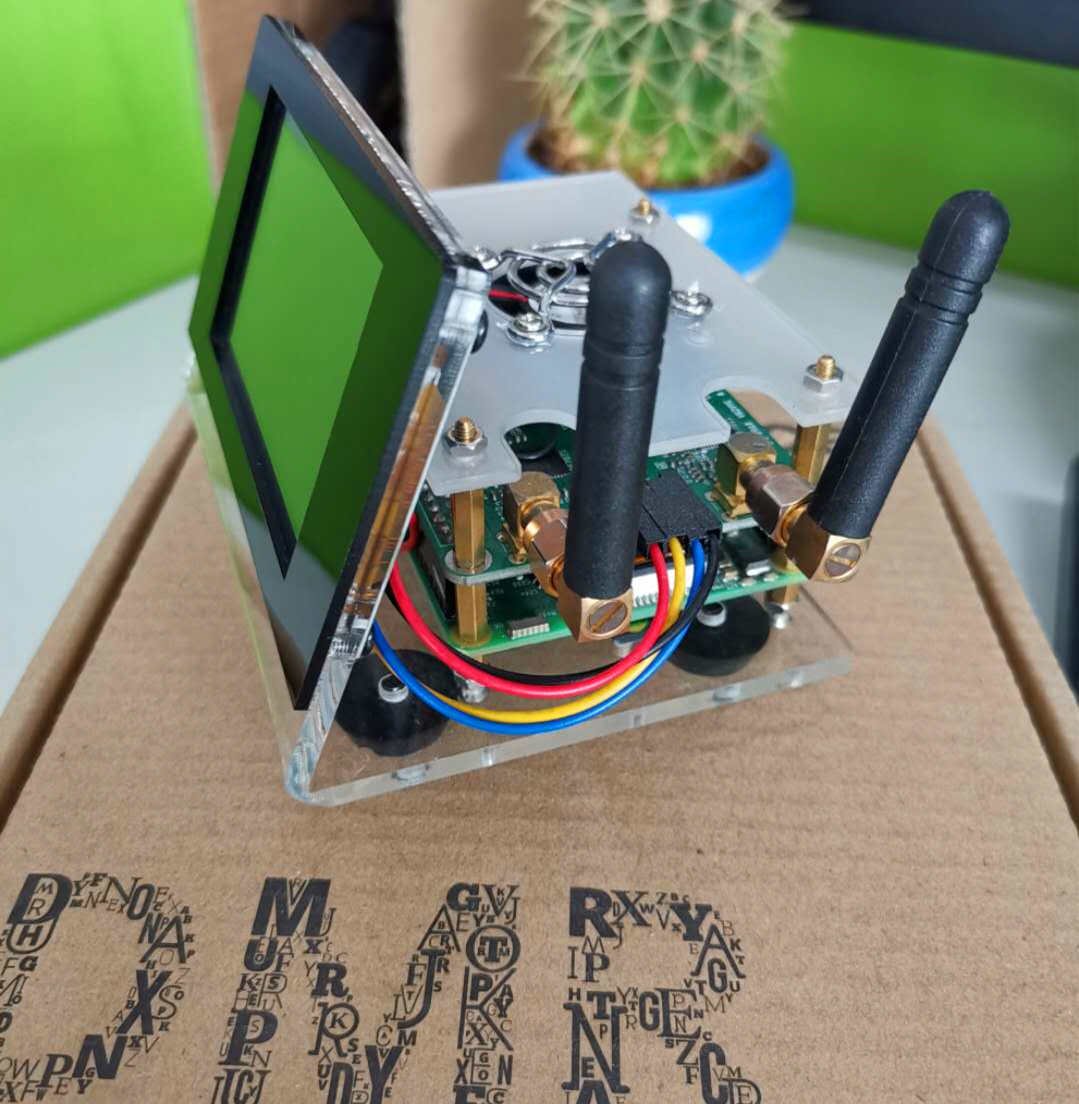
The seven photos from April 2022 in programs/wpsd-hotspot/Pix - My HotSpot Build/ document the original build sequence — which enclosure, how the Nextion ribbon was routed, where the antennas were mounted, what the assembled stack looked like. If a future rebuild is needed (case crack, Pi replacement, Nextion swap), the photos are the reference for “how it was assembled the first time” and “what the working layout looks like.” They are also the only photographic record of which specific MMDVM hat and Nextion display were installed — the silkscreens and model numbers should be visible in at least one of the photos.
4.1.11 DMR roaming — configure the D878 to prefer the DIY hotspot when in-range
The AnyTone D878 supports roaming zones (Vol 8) — a list of channels the radio scans through and picks based on signal strength. Configure a roaming zone that contains both the SkyBridge channel and the DIY hotspot channel(s), and the radio will automatically prefer whichever has the stronger signal. For the same-room two-hotspot deployment, this means the radio picks the closer hotspot without manual zone switching. For the case where you walk out of range of both (out the front door, into the car), the roaming zone falls through to a local repeater channel if one is configured, then loses contact gracefully. The roaming-zone CPS workflow is in Vol 8 §4 (Programming workflow) ↗.
4.1.12 The Pi-Star → WPSD migration was painless
For anyone considering the same migration from a working Pi-Star setup: the WPSD migration is in-place from a recent Pi-Star image. Download the WPSD upgrade tool from the W0CHP project, SSH in, run the upgrade, the system reboots into WPSD with all of the Pi-Star configuration preserved. The dashboard skin changes, a few menu items move, but every callsign / DMR ID / frequency / talkgroup / network connection stays where it was. The archive shows the discrete jump from Pi-Star_Config_* (2022) to WPSD_Config_* (2025) — same hotspot, same configuration, different dashboard.
4.2 Resources
Local manuals and configuration backups (../../programs/wpsd-hotspot/):
WPSD_Config_tjs-duplex_2025-Dec-29.zip— most recent dashboard export (entire/etc/pi-star/config tree under the currenttjs-duplexhostname)W0CHP - DMR config and notes.xlsx— per-hotspot configuration notes spreadsheet (talkgroup map, frequency plan, API key cross-references)wpa_supplicant.conf.docx— Wi-Fi credentials inwpa_supplicant.confformat wrapped in a Word document (do NOT publish)FBI_Surveillance_Van__3.nmconnection— NetworkManager Wi-Fi profile (same SSID + PSK in NetworkManager format)Pix - My HotSpot Build/— 7 build photos from April 2022 documenting the assemblyNextion Display/MMDVM-Nextion-Screen-Layouts-master/— WA6HXG’s HMI layout repository snapshot (HMI + TFT files for 2.4” / 3.2” / 3.5” Nextion variants, Blue and Green schemes, Simplex and Duplex flavours)Nextion Display/Info Sheets/EDITOR NEXTION.pdf— Nextion Editor reference manualNextion Display/Info Sheets/NEXTION_Tutorial_v2.03.pdf— Nextion display tutorialNextion Display/Info Sheets/Status Codes and Fields.txt— MMDVM-to-Nextion command reference (GitHub snapshot of the WA6HXG repo’s status-codes file)Nextion Display/STEP Files/Raspberry Pi 4 Model B.STEP— Pi 4B reference 3D geometry for enclosure designNextion Display/nextion-setup-vLTS/NextionEditor.exe— Nextion Editor vLTS (the layout editing tool, Windows-only)pi-star-legacy/— archive of pre-WPSD Pi-Star configurations:Pi-Star_RPi_V4.1.5_30-Oct-2021.zip— original upstream Pi-Star image (October 2021)Pi-Star_Config_2022-Mar-24.zip— first-build configuration snapshot (24 March 2022)BridgeCom_Pi-Star_Config_2022-Mar-26.zip— BridgeCom-skinned variant tried briefly two days laterDuplex/Pi-Star_Config_pi-star-duplex_2022-Apr-20.zip— duplex configuration at the earlierpi-star-duplexhostname
Upstream open-source projects:
- W0CHP-PiStar-Dash (WPSD) project home: https://w0chp.radio
- WPSD documentation site: https://wpsd.radio
- Mainline Pi-Star (legacy reference): https://www.pistar.uk
- MMDVMHost (core MMDVM-protocol daemon): https://github.com/g4klx/MMDVMHost
- DMRGateway (BrandMeister / TGIF / DMR+ bridge daemon): https://github.com/g4klx/DMRGateway
- YSFGateway / D-STARGateway / NXDNGateway / P25Gateway / M17Gateway (the gateway daemon family by g4klx): https://github.com/g4klx
- MMDVM_HS_Hat reference hardware (juribeparada): https://github.com/juribeparada/MMDVM_HS_Hat
- MMDVM-Nextion-Screen-Layouts (WA6HXG): https://github.com/WA6HXG/MMDVM-Nextion-Screen-Layouts
- ON7LDS Nextion Driver (the interactive variant for WA6HXG v3.x layouts): https://github.com/on7lds/NextionDriver
Nextion (vendor and tooling):
- Nextion vendor home: https://nextion.tech
- Nextion Editor download (newer release than the archived vLTS): https://nextion.tech/nextion-editor/
- Nextion model lineup and part-number guide: https://nextion.tech/datasheets/
MMDVM hat vendors and references:
- ZUM Radio (canonical MMDVM_HS_DUAL_HAT reference): https://zumradio.com
- BI7JTA (Chinese vendor with active firmware support): https://www.bi7jta.com
DMR network registration and infrastructure:
- RadioID.net (DMR ID registration + contact database): https://radioid.net
- BrandMeister (primary DMR network): https://brandmeister.network
- BrandMeister Last Heard feed: https://brandmeister.network/?page=lh
- TGIF Network (alternative DMR network): https://tgif.network
- W0CHP network: https://w0chp.radio
Cross-references within this series:
- Vol 1 (Overview) — series navigator
- Vol 8 (AnyTone AT-D878UVII PLUS) — the radio that talks to this hotspot; codeplug structure for the DIY hotspot zone follows the same pattern as the SkyBridge zone described there
- Vol 21 (SkyBridge Plus) — the turnkey commercial sibling; the canonical write-up of MMDVM modes, talkgroup selection, antenna posture, and DMR operations lives there and is cross-linked from this volume rather than duplicated
- Vol 2 (DMR Network Architecture) — load-bearing; what BrandMeister / TGIF / W0CHP actually are, talkgroup numbering, the static-vs-dynamic distinction, slot conventions
- Vol 4 (Frequency Planning & License Envelope) — hotspot frequency coordination for duplex operation specifically
Cross-references into the sibling Antennas project:
- Antennas Vol 29 (Use-case Matrix) — hotspot-antenna recommendations (low-gain wins for hotspots), per-radio antenna treatment
- Antennas Vol 31 (Regulatory & RF Safety) — Part 97 regulatory framing for low-power amateur transmitters
Wider amateur DMR references:
- DMR for Radio Amateurs (John S. Burningham, W2XAB) — the standard amateur introduction to DMR
- ARRL DMR Resources page: https://www.arrl.org/dmr
- ARRL Repeater Directory (for coordinated hotspot-frequency allocations by region): https://www.arrl.org/arrl-repeater-directory
- Pi-Star user guide (historical, pre-WPSD; many concepts still apply): https://www.pistar.uk/help.php
Comments (0)