WiPhone · Volume 3
WiPhone — Vol 3: Configuration & Firmware
Open-hardware ESP32-based SIP/VoIP phone
3.1 SIP/VoIP configuration
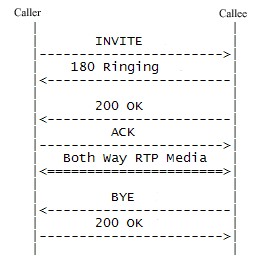
The WiPhone is a SIP user agent (in IETF RFC 3261 terms — a SIP UA, a softphone-class endpoint) running over Wi-Fi. To make a call, it needs three things: a Wi-Fi association to a network with internet access, a SIP account (server URL + username + password), and a far-end SIP URI to dial. With those, it acts like any softphone — registers with the SIP server, places and receives calls, exchanges RTP audio in both directions.
Wi-Fi setup. The device-side configuration is via the on-device menu: SSID selection, password entry on the T9 keypad (slow, since it’s a phone keypad not a QWERTY), WPA2 personal supported. WPA3 support is TBD — the ESP32-WROOM-32 has WPA3 in newer SDK builds, but whether v0.4 firmware enables it is unknown; verify against the on-device association behaviour with a WPA3-only network. Enterprise Wi-Fi (WPA2-EAP / 802.1X) is not supported in stock v0.4 firmware. Wi-Fi-band: 2.4 GHz only, since the ESP32-WROOM-32 has no 5 GHz radio — see Antennas Vol 1 for the broader “internal Wi-Fi antenna is enough for short-range applications; no external RF necessary” framing that applies here.
SIP account setup. The procedure is documented at length in ../manuals/wiphone/Setting up SIP Accounts — v0.4rc1 documentation.pdf. The fields that matter:
- SIP server / domain — the host the WiPhone registers against (e.g.
atlanta.voip.ms,chicago.voip.ms, your Asterisk box’s hostname or LAN IP, etc.). - Username / extension — assigned by the SIP provider or your PBX (e.g.
1234567_userfor VoIP.ms,1001for an Asterisk extension). - Password — the SIP password (separate from the provider’s web-portal password, in the VoIP.ms case; same as the extension secret in an Asterisk box).
- Outbound proxy — optional, used when the SIP server is behind a NAT or when a provider mandates it; most providers don’t need it.
- Registration interval — how often the WiPhone re-registers; default is typically 600 seconds, which is fine for any normal use.
- Codec preference — G.711 µ-law (the universal interoperable codec, ~64 kbps), G.711 a-law (European variant), GSM (low-bandwidth, ~13 kbps, lower quality), OPUS (modern, variable rate, best quality but TBD on v0.4 firmware support — verify against the on-device codec list).
The WiPhone supports multiple SIP accounts simultaneously (the v0.4 docs reference up to 4 stored accounts, switchable per-call) — useful for keeping a personal SIP, a work SIP, and a JMP.chat SIP-to-XMPP bridge all configured at once.
Provider compatibility. Tested-good provider list from community reports:
Table 1 — Provider compatibility. Tested-good provider list from community reports
| Provider | Notes |
|---|---|
| VoIP.ms | The default reference. $1.50/month per DID + per-minute or unlimited plans. Works cleanly with the WiPhone’s G.711 codec. |
| Twilio (Programmable Voice) | Works as a SIP endpoint; Twilio’s SIP trunking adds per-call cost on top of DID rental. |
| OnSIP | Free-tier SIP-to-SIP within the OnSIP user base, paid for PSTN. |
| Asterisk (self-hosted) | The hacker’s choice. Run Asterisk or FreePBX in a VM or on a Pi; the WiPhone is then a desk extension on your own PBX. Zero per-call cost. |
| FreePBX | The GUI on top of Asterisk; same SIP semantics, friendlier configuration. |
| JMP.chat | SIP-to-XMPP gateway; routes incoming SIP calls to your XMPP account. Niche but interesting for crossing protocols. |
| 3CX, Sangoma PBXact | Commercial PBXs; the WiPhone registers as a standard SIP extension. |
Call quality. G.711 over a reasonable Wi-Fi link sounds essentially identical to PSTN — no surprises. Jitter and packet loss on a marginal Wi-Fi link cause the usual artefacts (clicks, brief dropouts, the occasional warble). The WiPhone has no acoustic echo cancellation worth speaking of in v0.4 firmware — handset use is fine; speakerphone use in a hard-walled room produces noticeable echo to the far end. The Calls and Messages PDF documents the on-device call workflow (placing, answering, holding, transferring) at the level needed for end-user training.
SMS / messaging. SIP MESSAGE method is supported on some firmware revisions for in-band SMS between SIP endpoints — TBD on the current firmware, and dependent on the SIP provider supporting it on the back end. Don’t plan around SMS as a core feature.
STUN / NAT traversal. SIP behind NAT is the classic problem (the SIP signaling carries the IP/port for the RTP media stream, which gets rewritten by NAT). The WiPhone supports STUN configuration for NAT traversal — set the STUN server (Google’s stun.l.google.com:19302 works for casual use; your SIP provider may offer their own) and the WiPhone learns its public IP/port and inserts it into SIP messages. For symmetric-NAT networks, even STUN doesn’t help — you need TURN or an outbound proxy. Most home routers do cone NAT and STUN works fine; corporate networks vary.
3.2 Firmware updates
Firmware on the WiPhone is open-source ESP-IDF code, published at the GitHub repos referenced in §8. The Firmware Updates PDF in ../manuals/wiphone/ documents the user-facing update workflow; the hacker-facing build-from-source workflow is in the GitHub README.
OTA (Over-the-Air) updates. The v0.4 firmware supports OTA download over Wi-Fi from a HackEDA-hosted update server. The on-device menu offers a “check for updates” option; the device fetches a manifest, downloads the new firmware image, validates it, and writes it to the secondary OTA partition. On reboot, the bootloader switches to the new partition; the prior partition remains as a rollback target. The Firmware Updates PDF documents the user-side procedure (check, confirm, wait). Vendor firmware release cadence is slow — the v0.4rc1 docs date from a generation that’s been stable for years; new releases are sporadic.
USB-C wired updates (esptool). The hacker path. Connect USB-C, put the ESP32 into bootloader mode (the documentation covers the keypad-hold-during-reset sequence, since the WiPhone doesn’t have a dedicated BOOT button — it’s keypad-decoded by the application firmware until the application hands off), and use Espressif’s esptool.py:
esptool.py --chip esp32 --port /dev/ttyUSB0 --baud 460800 \
    write_flash 0x10000 wiphone-firmware-vX.bin
The exact offset and number of partitions depend on the firmware partition table (in the open repo). This is the path for custom firmware builds — the path to take for adding daughter-board support, changing codecs, modifying the SIP stack, or otherwise extending the device beyond stock behaviour.
Building from source. The build toolchain is ESP-IDF, the official Espressif SDK. Install ESP-IDF (the latest v5.x is fine; the WiPhone firmware may pin to an older v4.x depending on when it was last actively maintained — check the repo README), clone the firmware repo, run idf.py set-target esp32, idf.py menuconfig to set SIP credentials at build time or other configuration, idf.py build, idf.py -p COM7 flash (or /dev/ttyUSB0 on Linux/macOS).
This is a non-trivial build — ESP-IDF has a steep first-time learning curve, the WiPhone firmware has its own application architecture (real-time tasks, the SIP stack, the audio codec drivers, the display driver, the keypad scanner), and rebuilds take minutes. For one-off tweaks (changing a string, adjusting a default), it’s manageable. For deep modifications (new daughter-board drivers, new codecs, replacement of the SIP stack), it’s a project.
Forks and community firmware. Community forks exist with assorted improvements — bug fixes, additional codec support, UI tweaks, hardware variants. The Hong-Kong-Districts-Info fork (Hong-Kong-Districts-Info/wiphone-firmware) is the longest-lived community fork and is sometimes ahead of HackEDA’s mainline. Check both repos and pick the one that matches your hardware revision and your use case.
Firmware version on the bench unit. TBD — verify on-device. The version is displayed in the on-device “About” menu (per the v0.4 docs) and the build commit hash is in the firmware binary itself (extractable with strings on the flash dump).
Comments (0)