Baofeng F8HP · Volume 3
Baofeng F8HP — Vol 3: Programming
8-watt 2m/70cm handheld — high-output Baofeng
3.1 Programming workflow
The F8HP is unusable as a daily-driver radio without a codeplug — you do not want to manually keypad-program 50 repeater pairs with their CTCSS tones. The programming workflow is the most important operational topic in this volume.
3.1.1 The cable
The F8HP uses the Baofeng USB programming cable — the universal Kenwood-K1-compatible 2-pin connector. Three USB-to-serial chipsets ship inside the cable shell: genuine FTDI FT232RL (gold standard, plug-and-play across OSes, ~$20-25 from BaofengTech), WinChipHead CH340 ($8-12 clone option, fine with the CH340 driver installed), and Prolific PL2303 (genuine PL2303HXD works; clones cause years of Windows driver grief — Prolific’s driver actively detects and refuses counterfeits). Practical recommendation: BaofengTech-branded cable with genuine FTDI. The $15 premium over a no-name CH340 saves hours of driver troubleshooting. The same cable fits the VX-8 series and UV-5R/UV-B5 family — Kenwood K1 is the most common HT programming connector in the world.
3.1.2 The software — CHIRP is the answer
CHIRP is the universal cross-vendor programming tool — free, open-source, cross-platform, and the practical choice for the F8HP. The Baofeng vendor CPS exists (Windows-only) but nearly nobody uses it; CHIRP is more polished, more reliable, and supports far more models. The CHIRP F8HP driver is mature; the codeplug maps 1:1 to the radio’s flat 128-channel memory plus a settings page.
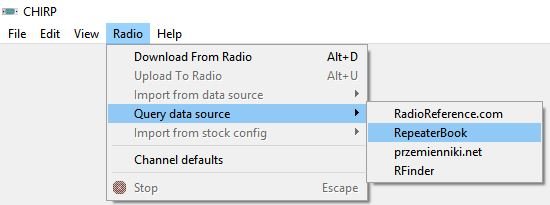
The workflow: install CHIRP from https://chirpmyradio.com (the latest daily-build; older CHIRP pre-2018 only knew about the UV-5R 5W class and caps F8HP max power at 5W — if CHIRP shows max 5W, your CHIRP is too old). Connect cable to radio (radio off), plug USB into computer, power the radio on. CHIRP → Radio → Download: model Baofeng → BF-F8HP, port = the COM/tty assigned by the OS, baud-rate auto-detect. Read takes ~30-60 seconds. The codeplug appears as a spreadsheet of 128 channels with the usual columns. Edit (most useful pattern: paste a .csv export from RadioReference), save .img + .csv to disk, then Radio → Upload to radio (~60-90 seconds).
Critical: do not unplug, power-cycle, or close CHIRP during upload. Interrupting can corrupt the radio’s calibration tables — the radio still TXes and RXes but reference oscillator and power levels drift outside spec. Recovery requires the service-menu procedure (§7.5). For the cross-software view — CHIRP vs vendor CPS vs RT Systems vs FreeScan vs Sentinel vs ProScan — see Vol 3 (Programming software landscape).
3.1.3 The codeplug structure
CHIRP’s view of the F8HP codeplug is a 128-row flat list. Each row carries: Loc (1-128), Frequency (RX), Name (6-char alphanumeric — verify on actual firmware, TBD against the unit), Tone Mode (None/Tone/TSQL/DTCS/Cross), Tone and tSQL (Hz), DTCS Code + polarity, Duplex (+/-/split/blank), Offset (MHz; typically 0.600 on 2 m, 5.000 on 70 cm), Mode (NFM/FM), Power (High/Mid/Low), Skip (scan flag), and a freeform CHIRP-only Comment. For full repeater pairs: Frequency is the RX (output), Duplex is + or -, Offset is the standard band offset, and Tone Mode + Tone carries the access tone. CHIRP’s “Repeater Book” plugin auto-fills this from repeaterbook.com by zip code — handy for first-time codeplug builds.
The 128-channel limit is generous for typical operation (local repeaters + simplex calling + GMRS/MURS/marine RX for situational awareness all fits) but tight for a national codeplug. The VX-8DR’s 1000 and the D878’s 4000 make the F8HP look constrained. Plan the codeplug for the operating area, not the country.
3.1.4 Cross-band programming gotcha
CHIRP lets you set TX outside the amateur 144-148 / 420-450 MHz ranges — the hardware will TX into 136-174 and 400-520 MHz, including MURS, GMRS, FRS, marine VHF, and Part 90 land-mobile. The radio is not Part 90 / Part 95 certified. TX into any of those bands is a type-acceptance violation even with the right license. The pragmatic posture: RX anywhere in the tuning range (legal almost everywhere); TX only on amateur 2 m / 70 cm. Full discussion: Vol 4.
3.2 Codeplug backups
The codeplug is the single most valuable artifact associated with this radio — months of accumulated repeater discoveries, tone settings, scan-list curation. Backup discipline is non-negotiable.
Two file formats: .img (full radio image, binary, ~6 KB, contains everything including calibration tables — the canonical backup) and .csv (channel-only, human-readable, editable in any spreadsheet, useful for diffing and sharing). The .img is the truth; the .csv is the documentation. Keep both, dated.
Where they live in this project: ../../programs/baofeng-f8hp/codeplugs/, dated filenames (YYYY-MM-DD-purpose.img), monthly archive. Most recent backup: TBD — verify against the programs/ directory (next time the radio is on the bench, run a full read and date-stamp).
Cadence: download-from-radio before any edit session (captures any keypad-side changes), save the post-upload .img immediately after, plus a clean read-and-save monthly even if no edits were made (catches silent corruption from brownouts or ESD).
Restore: CHIRP → File → Open → .img → Upload to radio. Same upload caveats — don’t interrupt, don’t power-cycle. If an upload corrupts the calibration tables, the service-menu recovery procedure (MENU + power-on, then keypad 350) is documented at miklor.com — “break glass in emergency” only.
Per-radio vs per-fleet: each F8HP unit has its own calibration tables, so the .img is not perfectly portable between units. Channel data ports cleanly via .csv; the binary .img overwrite of calibration can drift the destination radio off-frequency. Safe pattern: read each radio individually, edit only the channel data, write back to the same radio.
Comments (0)